


How Accessible Is a Retail App? The Carrefour Act for Good Audit
What happens when a screen reader user opens Carrefour’s app? We ran an accessibility audit to find out.
What is the European Accessibility Act (EAA)?
The European Accessibility Act (EAA) is an EU directive that aims to create a single internal market for products and services by removing the barriers caused by different regulations across member states.
The directive requires companies to make sure their products and services can be used easily by people with disabilities too. Until now, laws varied widely from country to country. This created confusion and made it harder to uphold the rights of people with disabilities across the EU.
In Romania, the directive was transposed through Law 232/2022, in force since 28 June 2025. The law covers e-commerce, banking, telecommunications and transport, among others. The reference standard is EN 301 549, which incorporates the international WCAG 2.1 guidelines (Web Content Accessibility Guidelines 2.1) at level AA. In short, apps must be accessible, and WCAG is the practical benchmark used to check this. Level AA means removing the major barriers for most users.
The main components of accessibility include:
- sufficient contrast between text and background;
- navigation by keyboard and by screen reader;
- alternative text for images;
- captions and transcripts for audio and video content;
- clear forms with explicit error messages;
- responsive design with support for zoom and larger text.
What retailers need to know
Individuals with disabilities are active consumers who evaluate options, compare services, and favor platforms that offer a seamless experience. When an application creates friction or delays during key steps like registration or payment, these customers simply choose alternative options.
Improving accessibility yields widespread benefits across your entire user base, including aging populations, individuals operating devices one-handed or in direct sunlight, and shoppers seeking a swift checkout. A well-designed, accessible product inherently optimizes usability for everyone which is a phenomenon widely recognized as the Curb Cut Effect.
The origin of the Curb Cut Effect dates back to disability rights advocacy in the 1960s and 1970s aimed at improving urban infrastructure. A major milestone was the implementation of curb cuts, sloped sidewalk ramps initially built for wheelchair users. It quickly became evident that these ramps benefited a much broader demographic, laying the foundation for universal design: creating products that accommodate as many people as possible from the outset. This principle translates directly to digital experiences. For instance, while video captions were created to assist individuals with hearing impairments, they are now routinely relied upon by anyone viewing content in sound-sensitive environments, such as public transit or quiet workplaces.

The purpose of the audit
We tested the Carrefour Romania app (Act for Good) to find out exactly how accessible it is for customers with visual impairments and for those who navigate without a touchscreen. The audit is the first step toward an app that anyone who wants to shop at Carrefour can use.
We evaluated four key flows:
- account creation;
- sign-in;
- activating the Act for Good program;
- the home screen.
Testing beyond the tools
The audit was conducted across both iOS and Android platforms using a two-stage methodology. First, we ran automated scans with Xcode’s Accessibility Inspector to catch structural flaws like missing labels, low contrast, small touch targets, invalid element roles, truncated text, and improper Dynamic Type scaling. Second, our colleague Ana performed manual testing using screen readers (VoiceOver on iOS and TalkBack on Android) and external keyboard navigation. Because automated tools only uncover surface-level issues, hands-on manual evaluation is essential to understand the real experience of navigating an app without relying on visual cues.
Audit results
1. Screen readers
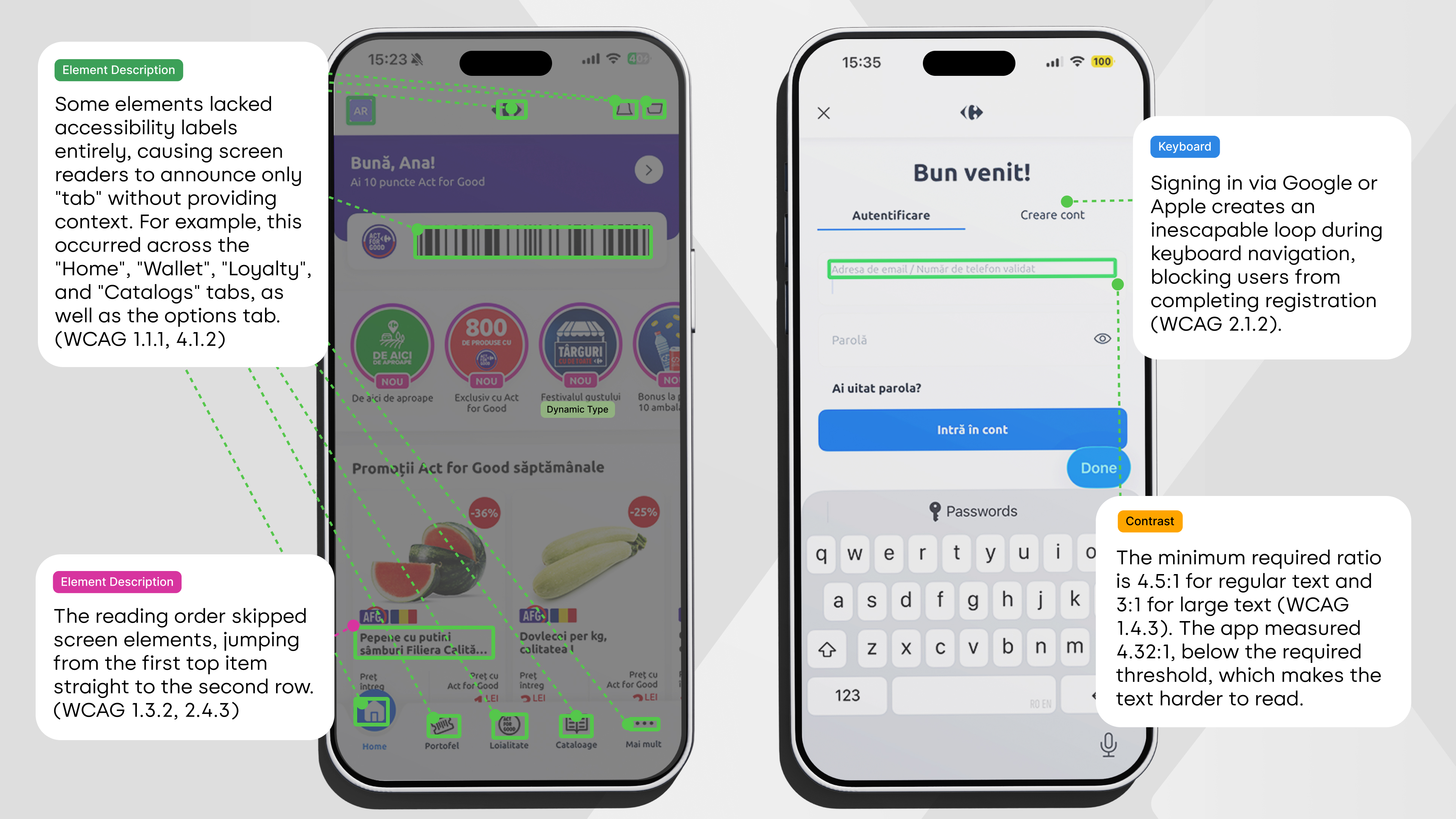
- Lack of descriptive accessibility labels: Some elements lacked accessibility labels entirely, causing screen readers to announce only "tab" without providing context. For example, this occurred across the "Home", "Wallet", "Loyalty", and "Catalogs" tabs, as well as the options tab. (WCAG 1.1.1, 4.1.2)
- Illogical reading sequence: The reading sequence did not match the visual layout on screen, jumping directly to the second row after announcing only the first element of the top row. (WCAG 1.3.2, 2.4.3)
- Inaccessible Stories close button: Screen readers failed to detect the close button within the Stories section, trapping users inside the view. (WCAG 2.1.1, 4.1.2)
2. Color contrast
Insufficient contrast between text and background in some sections affects readability for all users, not just those with visual impairments. The minimum required ratio is 4.5:1 for regular text and 3:1 for large text (WCAG 1.4.3). The app measured 4.32:1, below the required threshold, which makes the text harder to read.
3. Keyboard navigation
While most features functioned properly via keyboard, a critical issue arose during account creation: signing in with Google or Apple trapped users in an inescapable loop, creating what is technically known as a "keyboard trap." (WCAG 2.1.2)
Next steps
The audit findings will be implemented by the development team. Our recommendations:
- Address high-severity blockers first: Resolve critical barriers preventing user progression, such as authentication traps, trapped Stories navigation, or scanner unresponsiveness, prior to resolving minor usability friction.
- Embed accessibility into design components: Standardize screen reader labels, color ratios, and focus order directly within core UI libraries to prevent recurring defects in future releases.
- Conduct usability sessions with assistive tech users: Engage daily screen reader users in hands-on evaluation to uncover practical challenges that automated tools and audits routinely miss.
Conclusion
This audit identified specific opportunities for the Act for Good app to become more accessible for people with visual impairments. The issues are clear, measurable and come with precise fixes. Once they're implemented, more customers will be able to shop at Carrefour on their own.
Want to know how accessible your app is? Discover the UXProject accessibility audit.
.png)